Because we cannot verify them. The payoff depends on how the team worked before and what their labour costs are, and neither is in a workflow definition. This page states only what can be checked against the definition file: step counts, trigger types, where approval sits, and the limits. Build the same thing and you get the same mechanics.
Case Studies
These workflows are running in production
All six processes come from a subscription app team's production environment. This page covers only mechanics and scale: how they trigger, where a person approves, and how many steps each has. We don't invent revenue figures—every number on this page traces back to a workflow definition.
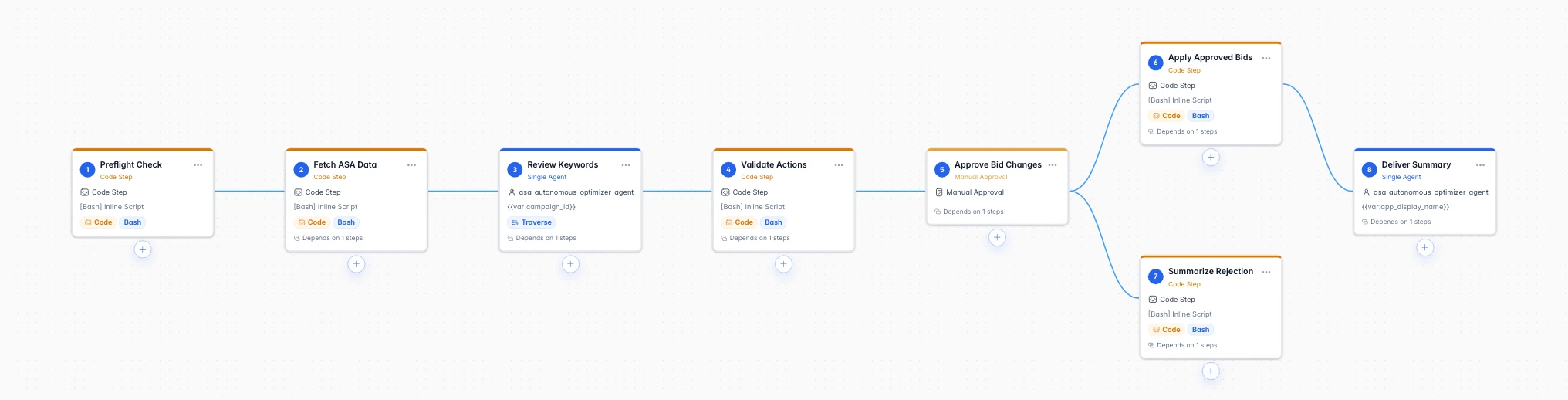
- asa-automation7 stepsManual Approval
- daily-growth-report5 stepsUnattended
- app-store-operations5 stepsManual Approval
- google-ads-optimization5 stepsManual Approval
- keyword-research4 stepsManual Approval
- competitor-monitoring5 stepsUnattended
Flagship case studyRead the Full Case Study
Apple Search Ads Campaign Automation
An AI agent reviews up to 5,000 targeted keywords one by one and proposes bid changes and pauses; humans only approve the bid changes — on rejection or timeout, nothing is touched.
64Steps in the Main Optimization Workflow
5,000Keyword Cap per Review Run
$200Cold-Start Daily Budget Hard Cap
ACROSS ALL CASES
What the 6 flows on this page add up to
6
Production workflows
31
Steps in total
4/6
Gate writes behind a human
2
Read-only, unattended
All case studies
5 more that also run every day
daily-growth-report
Daily growth report
Every morning, spend from both ad platforms and subscription revenue arrive in Slack as a spreadsheet, with AI commentary attached.
5 stepsv2.0.74Production Version of the Daily Report Template
app-store-operationsApp Store Operations Automation
Review replies, version submissions, TestFlight distribution, and certificate monitoring all run as workflows; AI-drafted replies score their own quality first, then wait for human confirmation before publishing.
5 steps192App Store Connect Resource Endpoints
google-ads-optimizationGoogle Ads Campaign Optimization
AI sorts creatives into four tiers by performance — BEST, GOOD, LOW, LEARNING — then generates new videos, images, and copy; uploads and pauses both wait for human approval.
5 steps32Steps in the Creative Optimization Workflow
keyword-researchKeyword Research Pipeline
The discovery pipeline mines keywords for multiple apps in bulk — read-only and unattended; the expansion pipeline cross-checks 4 intelligence sources, and adding keywords to the account is capped and gated by approval.
4 steps5Steps in the Discovery Pipeline
competitor-monitoringCompetitor Monitoring
Search competitors by keyword, capture live store data and screenshots, and produce a structured comparison report; one POST from your system triggers a run.
5 steps1POST Triggers a Monitoring Run
Why Teams Trust It
Why these case studies are credible
Every number on this page traces back to a workflow definition, and every account-writing operation goes through human approval.
The numbers trace back to definitionsStep counts, version numbers, and caps all come from the workflow definition files: 64 steps for the main optimization, the daily-report template at v2.0.74, and a per-run keyword review cap of 5,000.
All write actions go through approvalSteps that touch the ad account or publish content all stop at the approval gate: they execute only on approval, with zero changes on rejection or timeout.
Anonymized, but the mechanics are verifiableAt the team's request the brand is withheld and written throughout as a subscription app team; triggers, step structure, and guardrails are described exactly as configured in production.
FAQ
What people ask most when reading these
Pick a process like your day-to-day and get it running from a template
The template library has similar templates, and demo mode runs without credentials; connect your own credentials for production results.