No. Both views share one definition, so editing either side updates the other instantly — there is no one-way "export code from the canvas" step.
Workflow Editor
Drag on the canvas, or write YAMLIt's the same workflow either way
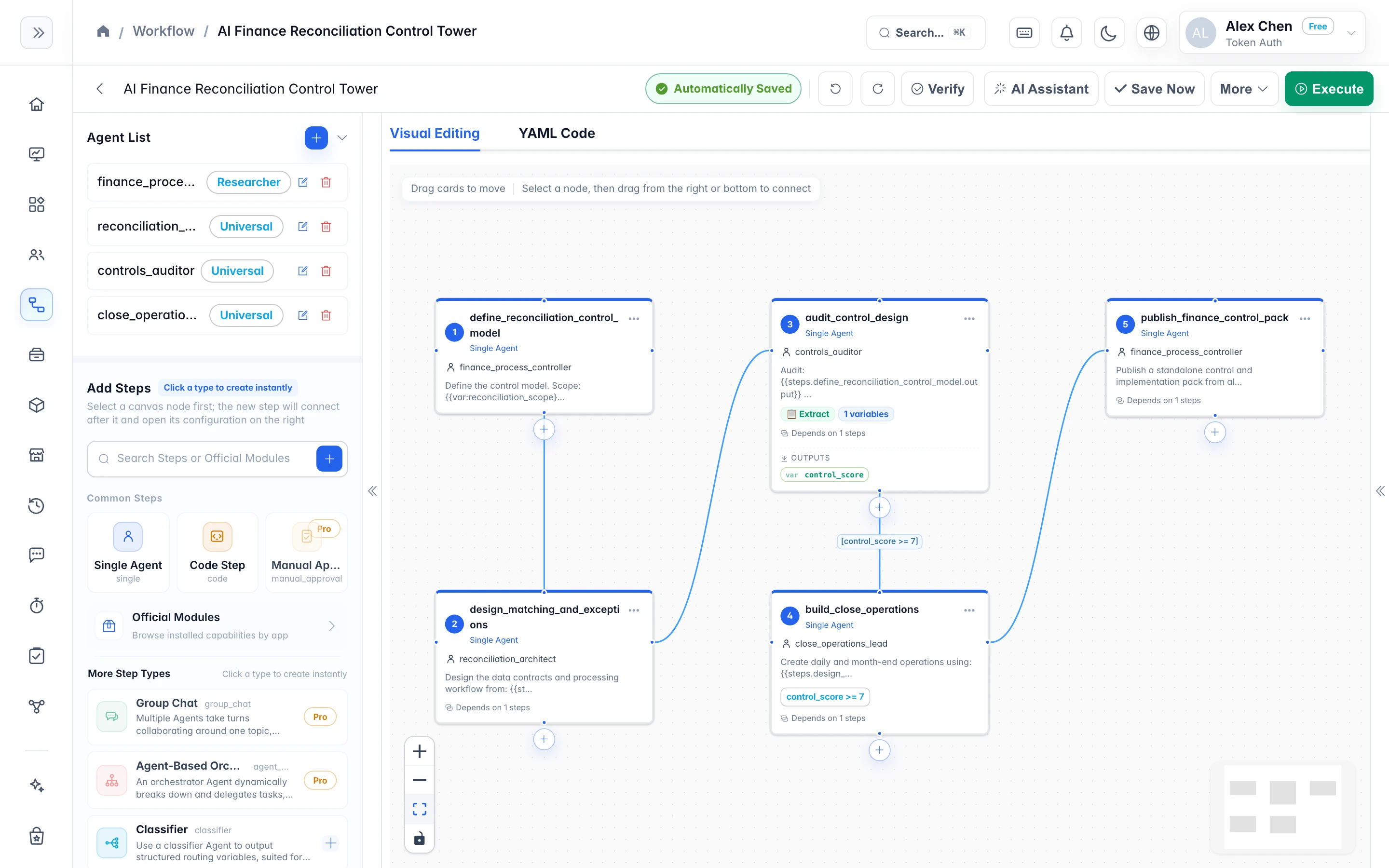
The canvas and YAML are two views of the same definition: drag a node and the code updates; change a line of YAML and the canvas redraws instantly. Every save is a new version you can roll back to anytime.
Two-way Sync
One definition, two ways to edit it
The canvas is for seeing the structure, YAML is for changing exact fields. Switch freely — there is no one-way "export code from the canvas" step.
canvasCanvas viewDrag steps into place and wire dependencies; branches and parallel paths are visible at a glance. Undo and redo mean a wrong turn costs one keystroke.
yamlYAML viewEdit fields directly, paste a whole definition, copy it into another workflow — switch back and the canvas redraws instantly.
syncAlways the same fileBoth views share one definition and nothing is exported one way, so the canvas and the code can never drift apart.
Step Type
9 step types, assembled into one process
Each step type does one thing; complex processes come from combining them. Free covers single, code and classifier; Pro unlocks all 9.
- Single
singleFREEClassic Single-Agent execution step, suited for writing, analysis, generation, and general task orchestration. - Group Chat
group_chatPROMultiple Agents take turns collaborating around one topic, ideal for reviews, brainstorming, and multi-role discussions. - Agent-Based Orchestration
agent_basedPROAn orchestrator Agent dynamically breaks down and delegates tasks, suited for complex open-ended goals. - Code Step
codeFREERun deterministic scripts or external files, suited for preprocessing, transformation, scraping, and automation. - Classifier
classifierFREEUse a classifier Agent to output structured routing variables, suited for branching, decisions, and condition-driven flows. - State Machine
state_machinePROOrchestrate multi-state transitions inside one DAG node, suited for approval loops, ticket lifecycles, and compound control flow. - Manual Approval
manual_approvalPROWait for manual approval before continuing, which is suitable for nodes that require manual control such as release confirmation, content review, and budget approval. - Module
sub_workflowPROSelect a published module from the module library as the current step. The module has encapsulated Agent and logic, and implements modular reuse through explicit inputs/outputs. - Workflow Output
workflow_outputPRORead explicitly published named outputs from another workflow's run history and map them to variables in the current workflow.
Step Modifiers
Same step, one line of config for different behavior
Modifiers are written directly on the step definition and can be stacked: add retry for automatic retries, add timeout to cut losses when time's up, and add manual_approval to stop and wait for a person.
- conditionRuns only when the condition holds. Write it as "variable operator literal", e.g. score >= 8; &&, || and parentheses are not supported.
- depends_onDeclare upstream step dependencies; runs only once all of them complete.
- parallelA batch of steps runs at the same time, none waiting on the others.
- retryRetries automatically on failure, with a configurable count.
- TimeoutTimeouts are treated as failures, so the process doesn't hang.
- repeat_untilRepeats until the result meets the bar, such as a score passing the threshold.
- iterate_overRuns this step once for each item in a list.
- aggregateMerges the outputs of multiple branches into one.
- extractExtracts structured fields from the output and stores them in variables.
- publish_outputsPublishes the result for other workflows to read.
- manual_approvalStops and waits for approval, auto-rejecting on timeout.
Multi-agent Orchestration
A few Agents hold a review meeting, and only a passing conclusion moves things forward
group_chat pulls several Agents with different roles into one discussion, speaking in turns and adjourning when a termination keyword is said or the round limit is reached; agent_based has a coordinator Agent decide who to hand off to next. On the right is the full definition of a content-review process.
- Review meeting: three Agents—copy, fact-check, and brand—take turns finding fault, releasing only once they agree
- Coordinator: takes the intermediate result, then decides which Agent to go to next—the path doesn't have to be hardcoded upfront
- Each Agent can use a different model: a cheap one for high-volume analysis, a strong one for the final review
- A subscription app team's ad keyword review already uses this mechanism: account-level Agents divide the work, keywords are reviewed in parallel batches, up to 5,000 per run
# three reviewer agents debate, a human gate before publish- step: write_draft agent: writer input: "Draft the release note for {{var:topic}}" - step: review_meeting group_chat: participants: [copy_editor, fact_checker, brand_reviewer] initial_message: "Review the draft. Reply REVIEW_PASSED when aligned." max_rounds: 4 speaker_selection: round_robin termination_keyword: REVIEW_PASSED depends_on: [write_draft] - step: publish agent: publisher condition: review_passed == "true" && risk_level != "high" manual_approval: enabled: true timeout: 3600
Start from a template
Skip the blank canvas
More than 528 ready-made templates cover the common flows. Pick one and adapt it — far faster than starting from nothing.
TemplatesBrowse ready-made workflows by scenario, then import and edit them right in the editor.Browse Templates MarketplaceWorkflows and modules published by the community and by us — install and run.Browse the market Case StudiesSee how other teams split their steps and where they put the human approval gate.See Case Studies
Diagnostics and versions
Mistakes are flagged, and bad edits can be rolled back
The editor checks as you type and the server checks again before saving; every save creates a version, so you can roll back when something breaks.
- The editor checks as you write, and the server validates again before saving, so common definition errors are caught at the save stage.
- Canvas actions support undo and redo, so the cost of trial and error is one keystroke.
- Every save creates a new version, and you can diff between versions; if something breaks in production, roll back to the last working one.
- unknown_agentAll 3 agent references resolve
- missing_inputEvery step input has a source
- unused_agentbrand_reviewer is defined but never referenced
- state_machine_unknown_stateAll state transition targets exist
Version Historyv1.4.0Just Nowv1.3.22 days agov1.3.1last week
FAQ
The questions people ask before they start
Boundaries
Three things to be clear about upfront
- The connector directory is curated, not exhaustive: 91 services across 7 categories. Anything outside it you call straight from a code step or attach as an agent tool; agents can connect to any MCP server.
- Free gives you single, code and classifier plus unlimited AI assistant use (on your own credentials); Pro opens all 9 step types.
- The canvas is only a view: moving a node does not change execution order — sequencing comes from depends_on and parallel.
Related Docs
The details are all in the docs
/docs/build/editorEditor GuideCanvas actions, switching between the two views, and how saving works.Open the Docs /docs/build/stepsStep Type ReferenceField reference for the 8 step types and all modifiers.Open the Docs /docs/build/yamlYAML SyntaxThe full syntax and examples for the workflow definition file.Open the Docs
Open the editor and build your first workflow
Sign up free to use the canvas and YAML; picking one of 528 templates to edit is faster than starting from scratch.